MIDI and notes
AI basslines you can edit: from a prompt to a MIDI file
One recorded bassline request in monody, the 32 notes it wrote, how to edit them, and how to take the part into another DAW as a .mid.
The short answer. Ask for a part, read the notes it wrote, change the ones you don't like, then export the clip as a MIDI file. The part is yours to edit at every step because it is notes, not audio. Below is one real request, the 32 notes that came back, a few edits worth trying, and the checks to run when the file reaches another DAW.
"AI bassline" can mean a plugin that suggests patterns, a web tool that returns a file, or an assistant inside a DAW. The useful question is the same for all of them: can you see the notes, change them and take them with you? This guide answers it for monody's assistant with one request that was recorded, not staged for this page.
What this is. The notes below come from a session recorded on 30 September 2026 with the shipping assistant on monody's demo project. The files you can download were rebuilt from those recorded notes on 4 October 2026, with a committed build of monody and no API key. There was no new assistant request, so this is a local controlled reproduction, not a new test of the assistant and not a benchmark. We have not opened the files in FL Studio or Logic Pro.
The request
The demo project runs at 124 BPM in A minor, with a kick and hats on a Drums bus and a lead. With the Drums bus selected, the prompt was:
Add a rubbery bassline that locks with the kick
The assistant replied:
Added a Rubber Bass track with a 32-beat A-minor line. It plays on the off-beats between the kick hits, so the kick keeps the downbeats and the bass fills the gaps. It has octave pops and a small turnaround in each four-bar phrase.
The app's changelist read 1 new track, 1 clip, 32 notes, 4 devices and routing, in 6.1 seconds. That one request was one undo step. The four devices are the synth, a drive, a utility device that keeps the bass mono below 130 Hz, and a limiter. They are not in a MIDI file, and the rest of this guide is about the notes.
The 32 notes
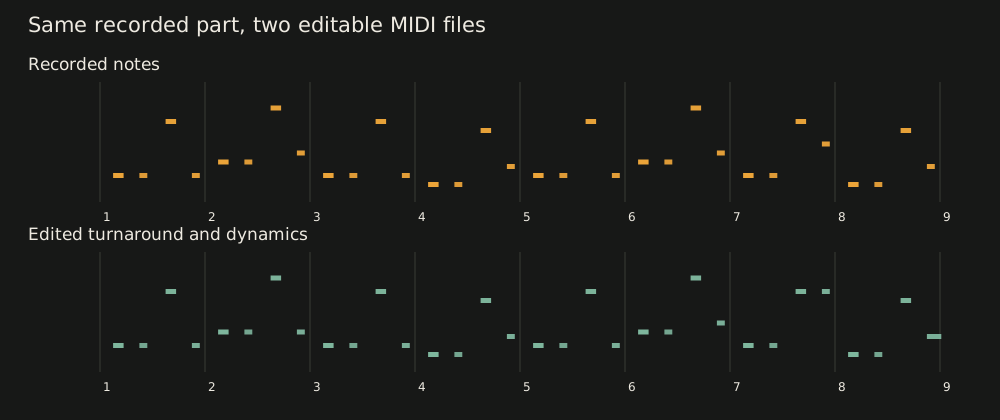
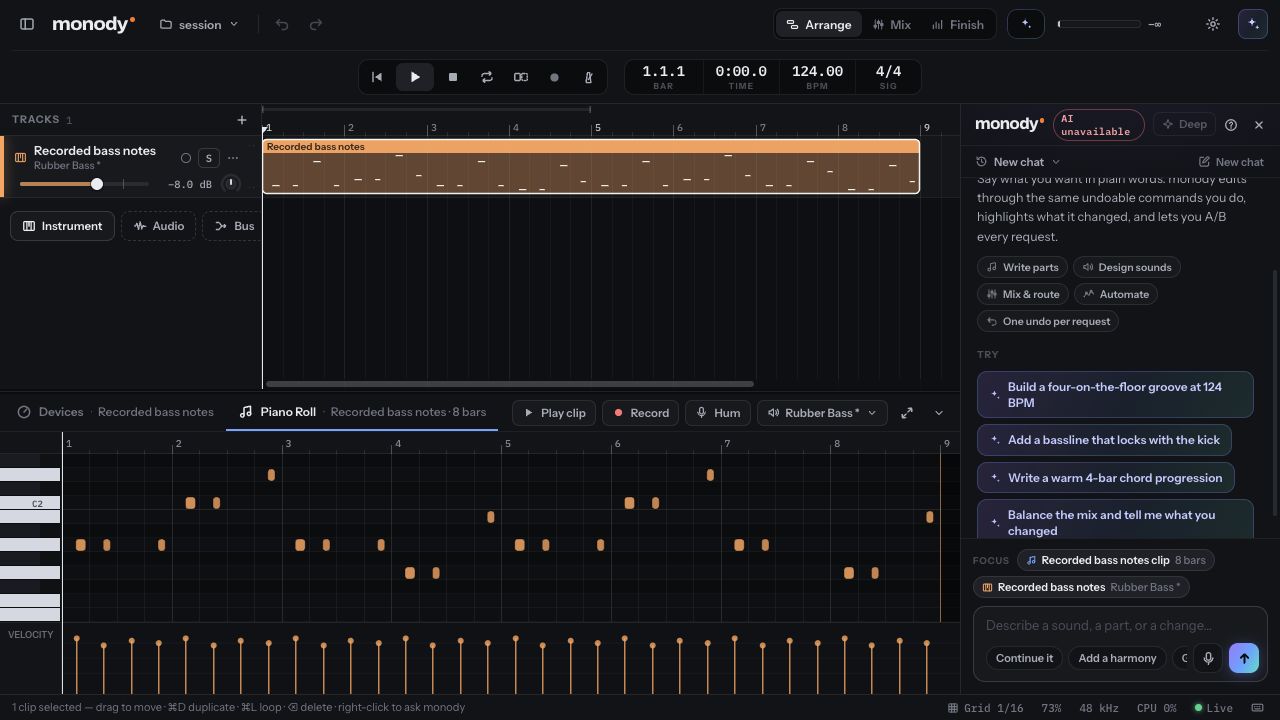
All 32 notes sit on the "and" of a beat (0.5, 1.5, 2.5, 3.5 within each bar). They are short, 0.3 to 0.4 beats long, with velocities of 90, 95, 100 or 105. In note names, bar by bar:
| Bar | Beats | Notes (MIDI number) | Role |
|---|---|---|---|
| 1 | 0 to 4 | A1 A1 A2 A1 (33 33 45 33) | root, root, octave pop, root |
| 2 | 4 to 8 | C2 C2 C3 D2 (36 36 48 38) | C root, octave pop, step up |
| 3 | 8 to 12 | A1 A1 A2 A1 (33 33 45 33) | same as bar 1 |
| 4 | 12 to 16 | G1 G1 G2 B1 (31 31 43 35) | G root, octave pop, lead back toward A |
| 5 | 16 to 20 | A1 A1 A2 A1 (33 33 45 33) | repeat of bar 1 |
| 6 | 20 to 24 | C2 C2 C3 D2 (36 36 48 38) | repeat of bar 2 |
| 7 | 24 to 28 | A1 A1 A2 E2 (33 33 45 40) | same, but the last note is E2 |
| 8 | 28 to 32 | G1 G1 G2 B1 (31 31 43 35) | repeat of bar 4 |
Three things in that table are worth knowing before you edit:
- The third note of every bar is an octave above the root. That is the "octave pop" in the reply.
- The roots follow A, C, A, G. The same movement, one chord per bar, is in the chord clip from the same session, which is why the two parts agree.
- Bar 7 is the only bar that differs. Its last note is E2 instead of A1. That is the small turnaround. D2 in bars 2 and 6 is a passing note, not a chord tone of C, so it is the first one to try if something sounds off.
Why it leaves room for the kick
In a four-on-the-floor pattern the kick lands on beats 1, 2, 3 and 4. Putting the bass on the "and" of each beat means the two never start together, and the notes are short enough that the bass is mostly gone before the next kick. It is the same idea as sidechain pumping, done in the notes instead of with a compressor.
It only works if your kick is where this one is. Check your own pattern first:
- Kick on the downbeats: the off-beat line should fit.
- Kick with off-beat hits or a rolling pattern: some bass notes will land with a kick. Move them or shorten them, or read kick and bass clashing for how to find the bars where it happens.
- Half-time or breakbeat tempo: the notes still sit on off-beats, but "between the kicks" may no longer be true.
Edit it
Open the clip in the piano roll. Everything below is a normal piano roll edit. You can also describe it to the assistant ("make the last note of every fourth bar a fifth higher"), and a request lands as one undo step you can flip with Before/After.
The downloadable edited file makes four changes to the original, listed in the manifest:
- Bar 2's last note goes from D2 to C2, so the bar ends on its root instead of a passing note.
- Bar 7's last note goes from E2 to A2, so the turnaround lands on the octave of A.
- The final note is held longer, 0.55 beats instead of 0.3.
- The second note of every four-note group is softer, velocity 82 instead of 90.
That leaves bars 2 and 7 as C2 C2 C3 C2 and A1 A1 A2 A2. Every note is still on an off-beat and the count is still 32. Other edits worth trying, in the same spirit:
- Keep the rhythm, change the pitches. Nudge pitches by a semitone or an octave. If you only change the third note of each bar, the groove stays and the line sounds different.
- Thin the octave pops. Delete the third note of bars 3 and 7. Fewer jumps makes the line steadier.
- Change lengths. Stretch the notes that land before a break so they hold, or cut them shorter for a tighter feel.
- Move one note. Slide one note per phrase off the off-beat by a sixteenth. It can add swing without changing the notes.
Edits like these are small, so the two renders further down sound close. Look at the notes in the piano roll as well as listening.
Take it into another DAW
In monody, open the clip in the piano roll and use its export button, or select the track and run "Export the selected track as MIDI…" from the command palette. A clip exports starting at its own first bar. A track exports with its clips where they sit in the project, and with the tempo. In monody's own window the file is saved to an Exports folder and shown in Finder.
The file holds notes, velocities, lengths, the track name and the tempo. It does not hold the instrument, the effects, automation or controller data such as a sustain pedal. Full-session export does not exist: it is one clip or one track per file.
Files for this example:
- Original notes: session-bass-original.mid
- Edited notes: session-bass-edited.mid
- Manifest of what each file is, the four edits and how the files were made: blog-example-manifest.json
- A monody project bundle (format version 1) with the 32 notes on one Rubber Bass track at 124 BPM, which monody's project import read back as one track and 32 notes in our check: session-bass-project.monody.json
Then, in your DAW:
- Set the project to 124 BPM before importing, or accept the tempo from the file if your DAW offers it.
- Import at the start of bar 1. The first note should sit on the "and" of beat 1.
- Put an instrument on the track. The notes arrive without a sound.
- Count the notes. There should be 32.
The import steps for FL Studio and Logic Pro, and what each carries, are in Move MIDI and stems between DAWs. Those are the manuals' instructions. We did not run them for this file.
Hear it
These two renders play the original and the edited notes on the same Rubber Bass sound chain, one bass line alone with no kick or other parts. monody's offline renderer made both at the same gain, 8 bars at 124 BPM in 16-bit stereo, and we measured their overall levels within about 1 dB of each other. They are references for the notes, not a mix, and not a claim that either version sounds better.
When the file doesn't behave
- Notes land on the wrong beat. The tempo differs or you imported away from bar 1. Match the tempo, then import at bar 1.
- Nothing plays. There is no instrument on the track.
- Notes sound too long or too short. Check the lengths in the piano roll after import. They should be 0.3 to 0.4 beats. If they aren't, look for an import option in your DAW that changes timing or lengths, and turn it off.
- The count is wrong. If you exported a track with two clips, both are in the file. Export the clip instead.
- A MIDI file won't import at all. Open it in a different DAW first to see whether the file or the importer is the problem.
What this isn't
- It isn't a plugin. If you want a tool that suggests basslines inside your DAW, plugins like Highbit's Bassline MIDI Generator work that way. We haven't tested it and make no comparison.
- It isn't the home-page demo. The Night Shift example on the home page places a prepared audio bass stem, and its 4.3-second request does not show the assistant writing MIDI.
- It isn't a finished song. It is a starting point you edit. Hooks and the parts people remember are your job.
- It isn't a test in your DAW. Treat the first import as a check.
Related
- Four requests, one real session: the whole recorded session this bassline comes from, with the other three requests and their timings
- Move MIDI and stems between DAWs: export and import steps in FL Studio and Logic Pro, and what a MIDI file does not carry
- Kick and bass clashing?: finding the bars where the bass and the kick collide
- Plugins in monody: using your own Audio Unit, VST3 and CLAP instruments on the bass track
Checked on 4 October 2026.
Questions
- Is an AI bassline real MIDI?
- In monody it is. The assistant writes ordinary notes into a clip in the piano roll, each with a pitch, start, length and velocity. You can move, delete or retype any of them, and export the clip or the whole track as a standard .mid file.
- What did the assistant write in this example?
- A track called Rubber Bass with 32 notes over 8 bars at 124 BPM in A minor. Every note starts on the "and" of a beat, so the kick keeps the downbeats. It took 6.1 seconds by the app's own timer, in a session recorded on 30 September 2026.
- Does the .mid carry the bass sound?
- No. A MIDI file has notes, velocities, lengths, a track name and tempo. The synth sound, the drive, the utility device and the limiter stay in monody. In your DAW you load an instrument and the same notes play on it.
- Is this a plugin I can put inside FL Studio, Logic Pro or Ableton Live?
- No. monody is a separate DAW. You write and edit the part there, then move it as a .mid. If you want a MIDI tool that runs inside another DAW, look at plugins built for that, and read what each one exports.
- Have you tested this file in FL Studio or Logic Pro?
- No. The notes were checked inside monody. The steps for FL Studio and Logic Pro in our transfer guide come from their manuals, and we haven't run a round trip through either.