Finishing tracks
Tech house arrangement: from an 8-bar loop to a 128-bar map
A six-section tech house arrangement with bar numbers and times at 128 BPM, what changes in each section, a techno variation, and a map to open in your DAW.
The short answer. Copy your loop out to the full length, then change who is playing at every 16 or 32 bars. The map below is 128 bars at 128 BPM, exactly four minutes: intro, groove, build, break, return, outro, with a time for every section start. It is an original plan with no tune in it, not a copy of a song and not a finished production.
Stuck in the 8-bar loop? explains why a loop that sounds finished never becomes a track and gives six ways out. This guide takes one of them, laying out a full arrangement, for tech house, with a note on techno. It gives you a complete example to fill in, because most arrangement advice stops at "add a break".
Bars to time
Dance music is easiest to plan in bars and check in minutes. At 4/4:
seconds per bar = 240 ÷ BPM
| BPM | One bar | 16 bars | 128 bars |
|---|---|---|---|
| 120 | 2.000 s | 32.0 s | 4:16.0 |
| 124 | 1.935 s | 31.0 s | 4:07.7 |
| 128 | 1.875 s | 30.0 s | 4:00.0 |
| 130 | 1.846 s | 29.5 s | 3:56.3 |
To find where a section starts, count the bars before it and multiply. The Return begins at bar 81, after 80 bars: at 128 BPM that is 80 × 1.875 = 150.0 seconds, 2:30.0. At 124 BPM it is 80 × 1.935 = 154.8 seconds, 2:34.8. Write the number in your notes so you can check it against the DAW's time ruler.
The map
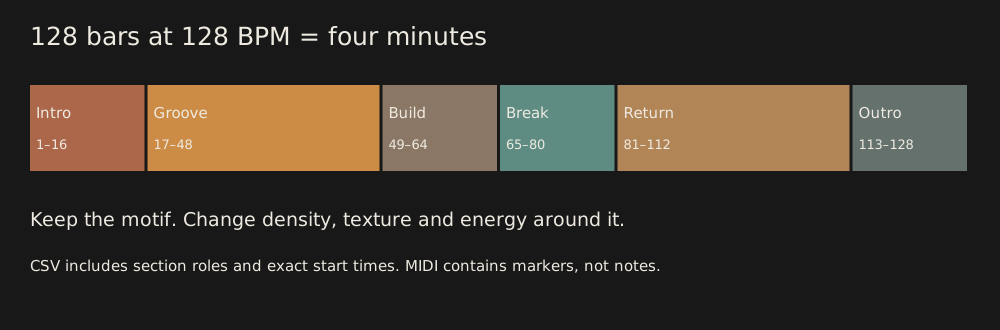
128 BPM, 4/4, 128 bars. Times are section starts, as in the CSV.
| Section | Bars | Length | Starts | Role |
|---|---|---|---|---|
| Intro | 1 to 16 | 16 | 0:00.0 | Kick and restrained tops; bring the bass in gradually |
| Groove | 17 to 48 | 32 | 0:30.0 | Bass and drums; reveal the main idea |
| Build | 49 to 64 | 16 | 1:30.0 | Remove the low end; increase movement |
| Break | 65 to 80 | 16 | 2:00.0 | Reduce density; keep one recognisable motif |
| Return | 81 to 112 | 32 | 2:30.0 | Bass and drums come back; vary the turnaround |
| Outro | 113 to 128 | 16 | 3:30.0 | Remove the hook and the bass; leave a useful exit |
The SVG shows the same sections to scale, with the line "Keep the motif. Change density, texture and energy around it." That line is the whole idea.
One way to staff each section
The CSV carries the roles above. This grid is a suggestion for filling them in, not part of the files:
| Element | Intro | Groove | Build | Break | Return | Outro |
|---|---|---|---|---|---|---|
| Kick | on | on | on, thinner | off | on | on, last to leave |
| Hats and percussion | restrained | on | on, more movement | sparse | on, varied | on |
| Bass | gradual, low-passed | on | off | off | on, new turnaround | off |
| Chords or stab | off | on, filtered at first | opens, moves | on, held | on | off |
| Motif | off | the main idea appears | teased | the one motif | on, varied | off |
| FX | texture | none | riser | atmosphere | impact on bar 81 | tail |
You don't need all those parts. The point of the grid is that every row changes at the start of a phrase, and that many of the changes are things leaving or returning, not new material.
Use the map in your DAW
- Set the tempo to 128 BPM, or to yours. The bars stay the same, and the times change as in the table above.
- Import the MIDI file at bar 1. It has no notes, only six section markers named after the sections. If your DAW ignores markers, use the CSV and place them by hand. If it offers to import the file's tempo, accept it only if you want 128 BPM.
- Copy your loop out to bar 128. Don't write new parts yet.
- Mute by the grid. Make each section by muting the rows marked off. The first pass is just subtraction.
- Add the transitions. A riser or filter sweep in the build, a gap or cut on the last beat before the return, an impact on bar 81.
- Play it through from the top. Fix the one place you got bored first.
- Then write new material where the plan says it should change: the main idea in the groove, the motif in the break, the turnaround in the return.
The MIDI file is a plan, not a song. We haven't opened it in FL Studio or Logic Pro. Move MIDI and stems between DAWs has those programs' import steps from their manuals.
What each section is for
- Intro (16). Lets a DJ mix in. Kick and restrained tops, with the bass arriving slowly, so there is nothing to clash with.
- Groove (32). The bass and drums settle and the main idea is revealed, but nothing is at full strength yet. Thirty-two bars is long, so hold something back for the second half.
- Build (16). Tension: the low end is removed and the movement increases, which makes the return feel bigger.
- Break (16). Density drops and one motif stays. It resets the ear and gives the track a face.
- Return (32). The bass and drums come back. Vary the turnaround so it isn't the groove again, and make the change something you can name.
- Outro (16). Remove the hook and the bass, and leave drums the next track can mix with.
A techno variation
Techno uses the same skeleton, with different habits:
- Longer mix-in. Make the intro and outro 32 bars, since the track often exists to be mixed.
- Fewer parts. Drop the motif row, and let a percussion loop and a filtered stab carry the interest.
- Movement, not a return. Change by sweeping filters and layering percussion across 16 bars instead of removing everything for a bar.
- A shorter or darker break. Eight bars of kick-less texture often does the job.
- A bassline tied to the kick. Keep it short and in one octave, then check it with kick and bass clashing.
Use it as a variation on the map above, not a second template. Pick one, finish a rough version, and see what you hear.
Check the plan against a real track
Open a track you love in your DAW, set its tempo, and mark where it changes. Count the bars between changes. You will usually find 8s, 16s and 32s, and a few exceptions, and the exceptions are what make it sound human. Then compare with the map. Change the map, not the track.
What monody does here
monody's assistant can write or rewrite a part for a section (four requests in one real session shows what that looks like, and AI basslines you can edit takes the bassline from it), and everything it changes is marked and undoable. We have not recorded it laying out a whole arrangement from a loop, and we don't claim it does. The map above is an original example for this guide and it was not made by an assistant. Section planning is yours. For the rest of the route to a finished file, see How to finish a track.
Checked on 4 October 2026.
Questions
- How long are the sections in a tech house track?
- Dance music usually moves in 8, 16 or 32-bar phrases, and changes land at the start of a phrase. The map in this guide uses 16 bars for the intro, build, break and outro and 32 for the groove and the return, 128 bars in all. Your reference track is a better guide than any formula.
- How long is 128 bars at 128 BPM?
- One bar of 4/4 lasts 240 divided by the tempo, so 1.875 seconds at 128 BPM. 128 bars is exactly 240 seconds, or four minutes. At 124 BPM the same 128 bars take 4 minutes 7.7 seconds.
- Does this map work for techno?
- The skeleton does, but techno usually changes more by filtering, layering and removing parts than by a return after a break. There is a techno section below with different choices. It is a variation, not a second template.
- Is this a finished song?
- No. It is a plan for where things change, with no tune in it. The MIDI file holds section markers only, no notes. Turning the plan into a track means writing and mixing the parts and deciding by ear. It is not something an assistant completed.
- Can I open the map in my DAW?
- Yes. There is a CSV with the sections and their start times, a MIDI file whose markers show the section boundaries, and an SVG overview. They are illustrative, and we haven't opened the MIDI file in FL Studio or Logic Pro, so check the first import.