MCP
Claude and FL Studio: every route between them, and what each reaches
Can Claude use FL Studio? No official connector exists. Seven community MCP bridges, three .flp tools and two files to load, with what each reads and changes.
The short answer. There is no official connection: no FL Studio connector in Anthropic's directory and no MCP server from Image-Line that an outside client can reach. FL Studio's own assistant, Gopher, runs on a model Image-Line doesn't name. Claude reaches FL Studio through community MCP servers you install. They can change the mixer, channels, plugin knobs, steps and piano-roll notes; none can place clips in the Playlist of an open project. With no bridge, Claude writes a MIDI file or a Piano roll script for you to load. One of each is below, with audio.
We make monody, a separate DAW with its own MCP server, so we have a stake in this. The FL Studio side comes from Image-Line's manual and each project's source code, read on 24 November 2026.
What is official, and what isn't
- No connector. On 24 November Anthropic's connector directory listed 1,217 connectors, none for FL Studio or from Image-Line. The music ones include Ableton Knowledge and Splice, which answer questions and search samples and open no project.
- No MCP server you can connect to. FL Studio 2026 carries one inside: Gopher's page loads a script Image-Line titles "FL Studio MCP bridge (browser side, runs in FL's WebView2)", which asks FL for its tool catalog and calls those tools from Gopher's panel. It is undocumented and closed to other clients. Asked for an MCP server in the forum, the site admin replied on 17 April 2026: "We are working on it." On 9 July a support reply in the same thread pointed to an FL Studio update and Gopher. The manual pages we read don't mention MCP, and neither do the FL Studio 2026.2 beta notes of 23 October.
- Gopher is Image-Line's own. Its knowledge base calls it "an FL Studio-oriented Large Language Model (LLM) text-based AI model" on an external server and names no provider, and the Gopher Control page offers no choice of model. What it does in a project is in our Gopher guide. A community project, flaik, reuses that internal channel to put another model in Gopher's panel; its README calls that a proof of concept and a gray area under Image-Line's terms of service.
One part, two ways into FL Studio
For this page Claude (Opus 5.5, in Claude Code) wrote an 8-bar part at 122 BPM in F minor: chords on Fm9, Dbmaj9, Bbm9 and Cm7, two bars each, and a bass that follows the roots with approach notes into each change. A Python script wrote it as a standard MIDI file byte by byte, and a second script read the file back.
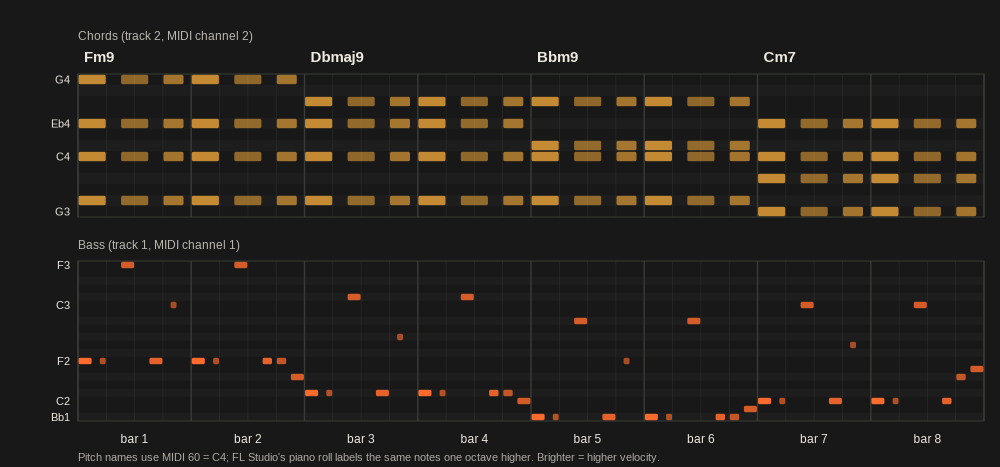
Read back: Format 1, 96 ticks per beat, 1,259 bytes. A conductor track with 122 BPM, 4/4 and an F minor key signature; Bass, 44 notes on MIDI channel 1 (Bb1 to F3); Chords, 96 notes on channel 2 (G3 to G4).
Load the MIDI file. Image-Line's MIDI import page lists the File menu, the Piano roll menu, or a drag from the Browser. FL Studio imports .mid, not .midi. From the File menu, "Create one channel per track" gives bass and chords their own channels. The file carries notes, tempo, meter, key and track names, and no sound; Move MIDI and stems between DAWs has the rest.
Or run the Piano roll script. claude-bass-and-chords.pyscript is written from Image-Line's Piano roll scripting reference, using only calls it documents (ScriptDialog, Note(), score.addNote and five more). Put it in Documents/Image-Line/FL Studio/Settings/Piano roll scripts, open an empty channel's Piano roll and pick it from the Piano roll menu's Script list. It writes one part per run and no tempo: set 122 BPM yourself. Against a stand-in that implements only those calls, it added 44 and 96 notes identical to the MIDI file. FL Studio names MIDI note 60 as C5, so the bass reads Bb2 to F4 there (middle C, explained).
Why every bridge works the same way
FL Studio runs Python in two places, both documented by Image-Line:
- MIDI controller scripts (reference): a
device_<name>.pyfile inSettings\Hardware\<name>, chosen as a Controller type in MIDI Settings. Its modules cover transport, mixer, channels, patterns, Playlist tracks, markers, plugin parameters, the UI and the step sequencer. It hears the outside world through a MIDI input, so most bridges need a virtual MIDI port: the IAC Driver on macOS, loopMIDI on Windows. - Piano roll scripts (reference):
.pyscriptfiles that add, change and delete notes. They run when you pick one from the Piano roll menu; "Run last script again" is Ctrl+Alt+Y (Cmd+Opt+Y on a Mac).
We searched every table in the MIDI scripting reference. None places, moves or lists Playlist clips, renders, or reads or writes piano-roll notes, and none is documented as a plugin loader; channels.midiNoteOn only plays a note. That is the ceiling over every bridge below. Two get plugins in anyway: fLMCP loads effect presets into mixer slots with ui.launchAudioEditor, and PostFader on macOS picks instruments and effects from FL's Add menu. To write notes, a bridge leaves a request for its Piano roll script and presses Ctrl+Alt+Y for you, after you have run the script once by hand.
Every route, side by side
A GitHub search for "fl studio mcp" returned 130 repositories on 24 November, many unrelated. Below: every general-purpose FL Studio bridge with ten or more stars that connects to a running FL Studio, then three servers that work mainly on .flp project files (two also have a smaller live route). Tool counts are from the source at the linked commit.
| Route | Claude reads | Claude changes | You install | Runs on | Who, last commit |
|---|---|---|---|---|---|
| A MIDI file Claude writes | what you paste or describe | nothing in FL: you import the file | nothing | any DAW | you |
| A Piano roll script Claude writes | nothing in FL | notes in the open Piano roll, when you run it | one .pyscript file | Windows, macOS | Image-Line's documented API |
| karl-andres/fl-studio-mcp, 57 tools | mixer, channels, plugin knobs, steps, transport, notes in the open Piano roll | the same, plus routing and presets | server, controller script, Piano roll script, virtual MIDI port | macOS, Windows; FL 20.7+ | karl-andres, MIT, 19 Nov 2026 |
| rosasynthesiz/flstudio-mcp, 90 tools | mixer, routing, plugin knobs, patterns, Playlist track names, playback peaks, exported audio | mixer, routing, plugin knobs, patterns, steps, new notes; it can't read notes back | server, controller script, two loopMIDI ports on Windows (none on macOS), Piano roll script run once a session | macOS, Windows; FL 2025+ | rosasynthesiz, MIT, 18 Nov 2026 |
| synopsys0/postfader-fl-studio-mcp (PostFader), 85 tools | routing, effects, channels, patterns, plugin knobs, undo history, notes (one channel and pattern at a time), exported audio | faders, pan, sends, routing, tempo, plugin knobs, presets, notes; on macOS, instruments and effects from FL's Add menu; read-only until you allow writes | installer, bridge script, virtual MIDI port, Piano roll script run once a session | macOS, Windows; FL 2026 (26.1.3+) | synopsys0, Apache-2.0, 5 Oct 2026 |
| geezoria/FLStudioMCP (fLMCP), 176 tools | transport, patterns, channels, mixer, plugins, notes, Playlist tracks | the same, plus effects into mixer slots by name, live automation recording, saving | installer, controller script, loopMIDI (needed on FL 2026), Piano roll script | Windows; most tools on macOS; FL 2024+ | geezoria, MIT, 22 Nov 2026 |
| szichedelic/fl-studio-mcp, 68 tools | transport, channels, mixer with EQ and sends, plugin knobs, patterns, Playlist tracks, markers | transport, tempo, patterns, mixer, sends, plugin knobs, Serum presets, notes | Node server, controller script, two virtual MIDI ports, Piano roll script | Windows, macOS | szichedelic, no licence file (package.json says ISC), 3 May 2026 |
| calvinw/fl-studio-mcp, 5 tools | notes in the open Piano roll | notes | server, Piano roll script, Accessibility permission | macOS; Windows partly | calvinw, MIT, 14 Dec 2025 |
| veenastudio/flstudio-mcp, 5 tools | nothing | plays notes in while FL records; play, stop | server, controller script, loopMIDI on Windows | Windows, macOS | veenastudio, no licence file, 8 Jul 2025 |
| CryptoJones/FL-Studio-MCP-Server, 22 tools: 8 for .flp files, 9 for a running FL through Flapi, 3 for bundled Piano roll scripts, 2 status | a saved .flp: tempo, metadata, channel and pattern names, Playlist | a new .flp from FL's Empty template, tempo, names, samples as channels and audio clips | Python server | Python 3.11+, no FL for .flp tools | CryptoJones, Apache-2.0, 1 Aug 2026 |
| dawhubapp/flstudio-mcp, 3 tools | a saved .flp, or the open project over MIDI | in the .flp: notes, patterns, routing, Playlist clips, arrangements; in the open project: tempo, channels, mixer, patterns, steps, plugin knobs | server, flpdiff parser | macOS; FL 25 or 26 | dawhubapp, MIT, 8 Oct 2026, "early preview" |
| ProjectFlowmar/project5pi-midi-for-claude, 8 tools | your FL templates | a new .flp with notes, patterns and Playlist clips, rendered by FL's command line | Python package, ffmpeg | rendering on Windows, FL closed | ProjectFlowmar, MIT, 11 Nov 2026 |
Left out: ohhalim/flstudio-mcp (58 stars, a bebop-solo experiment rather than a general bridge), IzzoSol/FL-STUDIO-AI, which writes MIDI data and reaches FL only by pressing keyboard shortcuts, and ryurikoneko/DAWLoop, a task-level layer that reaches FL through karl-andres's server.
Each bridge is a local server that Claude Desktop or Claude Code starts on your computer. Claude's web app reaches only servers on the public internet, per Anthropic.
Which route for which job
- One idea, no setup: the MIDI file. Claude Code can run the code that writes it; you drag it in.
- Notes into the pattern you're on, again and again: a Piano roll script. Read it before you run it.
- Mixer moves and plugin knobs in conversation: rosasynthesiz, PostFader or fLMCP. rosasynthesiz re-reads each plugin write and says when FL refused the value.
- Claude reads your notes before writing: karl-andres, PostFader or fLMCP.
- A new project with clips already in the Playlist: the .flp writers, with FL closed. They leave your open project alone.
Claude Skills for FL Studio
A skill is a folder of instructions Claude loads when a task matches; our skills guide explains them. Three FL Studio skills on GitHub, read at their latest commits:
- delorenj/flstudio-scripting-skill: a reference to FL Studio's Python APIs, the PyFLP parser included. It helps Claude write scripts and connects to nothing. It says to put scripts in
Shared\Python\User Scripts, a folder the MIDI scripting manual doesn't list for scripts (it namesSettings\Hardware\<name>, andShared\Python\Libfor extra modules). No licence file; last commit 6 February 2026. - flstudio-production, shipped with rosasynthesiz's server: which of its tools to call. Without the server it does nothing.
- flstudio-compose, for the flcli command-line tool, names the three ways notes get in: a Piano roll script (accurate, one manual click), real-time recording ("ms-level jitter", FL must be focused) or the step sequencer, which silently drops the pitch. Its repository calls itself unmaintained.
What goes wrong, and what none of them reach
- The Playlist and rendering; instruments on most. PostFader's and fLMCP's docs both list Playlist clips as out of reach. Only PostFader adds an instrument, on macOS, through FL's Add menu; fLMCP loads effects only, and rosasynthesiz's
fl_load_pluginsays FL "CANNOT do this". Rendering needs FL's own windows: fLMCP's render tool says "FL currently requires its render dialog", and PostFader renders only a saved .flp, without unsaved changes. - The bridges disagree about FL's Python. rosasynthesiz says a Piano roll script on FL 25.2.5 can't read or write files, so it writes notes into a fresh script each time; karl-andres's script reads and writes JSON files. PostFader says FL 2026's MIDI-script interpreter can't use files or sockets; fLMCP says
open()works. The manual is silent; a bridge that works on one FL release can stop on the next. - Focus and permissions. Keystroke triggers need FL in front: on Windows, karl-andres warns, "FL Studio will pop to the front for a moment" on every note write. calvinw needs macOS Accessibility access.
- PyFLP is old. The best-known .flp parser last released in June 2023; CryptoJones ships a shim because PyFLP 2.2.1 "can't parse a single event on modern CPython".
- Claude hears none of it. Every route moves notes and settings; what Claude gets instead of sound has its own guide.
When the bridge runs out
If the part matters more than the session, move it as files: Move MIDI and stems between DAWs covers both directions.
If you want Claude on the whole session at once, that takes a DAW whose MCP server also reaches the arrangement and renders what you have open; DAW MCP servers compares them. monody, the DAW we make for Windows and macOS, has one inside the app. For the audio above, Claude Code read monody's reference, added two tracks and 140 notes in one undoable run_commands call, set two stock sounds, read the notes back identical to the file and rendered: 12 calls, none refused (session log). monody doesn't open .flp projects, so an FL part comes over as a MIDI file. MCP is part of every monody plan, Free too, with a monody account and your own Claude Code access, and its calls don't spend monody's AI credits.
Checked on 24 November 2026: Anthropic's directory and help article, Image-Line's manual, forum and knowledge base, and every repository and skill above at the linked commit, with tools counted in the source. We read the source and the manual; we did not run these in FL Studio, which isn't installed on the computer this was written on. Claude Opus 5.5 in Claude Code wrote the part, the MIDI file and the Piano roll script. The audio is from monody 0.9.7 on a Mac, through tool calls sent to monody's built-in MCP server on the same computer and logged; the published log shortens local folder paths. The render reproduces bit for bit in the released 0.9.7 app.
Sources
- Anthropic: connector directory; Help Center, custom connectors using remote MCP
- Image-Line manual: MIDI Scripting, Piano roll Scripting API, Piano roll menu, MIDI import, Gopher Control
- Image-Line: Gopher's page and the
mcp_bridge.jsscript it loads (last modified 1 October 2026) - Image-Line forum: MCP feature request, FL Studio 2026.2 BETA-1; knowledge base: Is Gopher an AI
- Repositories and skills at the commits linked above; flaik; PyFLP, latest release v2.2.1 (5 June 2023)
- monody: MCP, plans
All read on 24 November 2026. FL Studio is a trademark of Image-Line Software. monody is not affiliated with or endorsed by Image-Line, Anthropic or the projects named here.
Questions
- Can Claude use FL Studio?
- Not on its own. With a community MCP server installed, Claude can read and change the mixer, channels, plugin parameters, step sequencer and piano-roll notes of the project you have open. Without one, it writes a MIDI file or a Piano roll script that you load yourself.
- Is there an official Claude connector for FL Studio?
- No. On 24 November 2026 Anthropic's connector directory listed 1,217 connectors and none was for FL Studio or from Image-Line. Image-Line documents no MCP server for outside clients; the one inside FL Studio 2026 serves its own assistant, Gopher. Every server Claude can connect to is a community project.
- Is there a Claude skill for FL Studio?
- A few on GitHub. One is a reference for FL Studio's Python scripting, the others are instructions for one particular MCP server or command-line tool. A skill gives Claude knowledge, not a connection to FL Studio.
- Is there an MCP server for FL Studio?
- Not one from Image-Line that Claude can connect to. Community servers such as karl-andres/fl-studio-mcp, rosasynthesiz/flstudio-mcp, PostFader and fLMCP connect Claude to a running FL Studio through a MIDI controller script and a Piano roll script that you install. Others edit saved .flp files with FL Studio closed.
- Can Claude arrange my song in the FL Studio Playlist?
- Not in a project you have open. FL Studio's MIDI scripting reference has no function that places or moves Playlist clips, and the bridges list that as a limit. Tools that write .flp files can place clips in a new project file, with FL Studio closed.