MCP
Claude Skills for music production: what exists, and one to copy
What a Claude Skill is, 19 music skills sorted by job with what each needs, and an arrangement-map skill we ran on a real session, ready to copy.
The short answer. A Claude Skill is a folder with a
SKILL.mdfile: a short description Claude always sees, and instructions it reads only when your request matches. On 24 November 2026 we found 19 music skills worth listing. They make audio, write Suno prompts, drive Ableton Live, REAPER, Bitwig, Pro Tools or MuseScore, or work with chords and MIDI. Most need other software installed. You can write your own: ours maps an arrangement bar by bar in 59 lines, and it is a download below.
We make monody, a DAW with an MCP server built in. We ran the skill on monody's server; for another DAW's server you change the lines that name monody.
What a Claude Skill is
Anthropic calls Skills "reusable, filesystem-based resources" that load on demand (Agent Skills overview). A skill is a folder. Its SKILL.md opens with YAML front matter: a name (lowercase letters, numbers and hyphens, at most 64 characters, never "claude" or "anthropic"; the Help Center's upload page also shows a human-friendly name such as "Brand Guidelines") and a description of what the skill does and when to use it. The instructions follow. Claude loads it in three stages:
| Stage | When Claude loads it | In our skill |
|---|---|---|
| Name and description | At startup. With many skills installed, Claude Code drops some descriptions to fit its listing | 20 + 185 characters |
The rest of SKILL.md |
When a request matches the description, or you type /mapping-arrangements |
3,567 bytes, 663 words |
| Bundled files, script output | When the instructions point to them | None bundled. The run read 173,129 characters from monody |
In Claude Code a personal skill lives at ~/.claude/skills/<name>/SKILL.md, a project skill at .claude/skills/<name>/SKILL.md (Claude Code docs). On claude.ai you upload the folder as a ZIP; the Help Center lists every plan from Free to Enterprise, with code execution on (Use skills in Claude), while the developer docs list custom uploads from Pro up. The developer docs say custom skills don't sync between surfaces. Claude Code's docs and the Help Center give one exception: skills enabled on claude.ai load in Claude Code 2.1.273 or later when you sign in with the same account, one way only. A skill in ~/.claude/skills/ never reaches claude.ai, and the API is separate. The format is an open standard, Agent Skills, that other tools read too.
A skill is not an MCP server
A skill is instructions and files: it tells Claude how to do a job. An MCP server is the door into a program: the tools Claude calls to read or change it (What are Skills?). A skill that works on your session needs a way into the DAW too, usually its MCP server, sometimes a scripting API or a command-line tool the skill calls: DAW MCP servers compares them, and Claude for music production covers the other routes.
Music skills that exist today
We read each at its source on 24 November 2026: the SKILL.md, and for most the README, at the commit in the last column. We installed none of them. Anthropic's own skills repository holds 19 skills, none for music or audio.
| Job | Skill | What it does | What it needs | Licence | Read at |
|---|---|---|---|---|---|
| Makes audio | claude-music | 12 skills: songs with vocals, covers, section edits, made by ACE-Step 1.5 on your computer | NVIDIA GPU with 4 GB VRAM or more (8 GB advised), about 10 GB of disk | MIT | 12 Aug |
| Makes audio | minimax-music-gen | Songs from a description or your lyrics, and covers, by MiniMax's model | Node.js, the mmx CLI, a MiniMax API key |
MIT | 10 Nov |
| Makes audio | composing-with-pytheory | Writes parts in Python, renders WAV, MIDI, MusicXML or tab | Python, pytheory |
MIT | 10 Nov |
| Makes audio | strudel-claude | Strudel live coding, played by a local Strudel page | Node.js, a browser | MIT | 3 Feb |
| Makes audio | claude-collider | SuperCollider live coding, with a songwriting skill | SuperCollider, Node.js, its MCP server | MIT | 1 Nov |
| Audio-model prompts | claude-ai-music-skills | 63 skills: concept, lyrics, Suno prompts, stem cleanup, mastering, release | A Suno account, Python 3.11+; the README advises a Claude Max plan | CC0 | 20 Nov |
| Audio-model prompts | suno-music | A 300-character style description and tagged lyrics to paste into Suno | A Suno account | MIT | 28 Oct |
| Drives a DAW | ableton-skills | 12 producer workflows (chords, MIDI cleanup, mastering prep...) | Live and a separate Ableton MCP server | MIT | 23 Sep |
| Drives a DAW | LivePilot | 15 skills shipped with its Live MCP server: notes, devices, arrangement, mixing | Live 12, Node.js 18+, Python 3.12+, its Remote Script | BSL 1.1, MIT from 2030 | 19 Nov |
| Drives a DAW | ableton-producer-skills | Basslines, reharmonizing, humanizing in the open Live Set | Live 12, Ableton's Extension SDK (beta), Developer Mode on | MIT | 5 Jun |
| Drives a DAW | Producer Pal examples | Six skills, among them reading .als files without Live and sending audio to Gemini for comments |
Node.js 18+; a Gemini API key; Producer Pal needs Live 12.3+ with Max for Live; two of the six are macOS-only | MIT | 28 Oct |
| Drives a DAW | reaper-mcp mastering | EQ, compression and a true-peak limiter on a running REAPER session's mix bus | REAPER, Node.js, its bridge script | MIT | 20 Nov |
| Drives a DAW | bitwig-agent | Bitwig help, and edits through its own server or CLI | Python 3.11+ (uv), its server or CLI and its Bitwig extension; Grid and modulator access only on Bitwig 6.1.4 | MIT | 24 Nov |
| Drives a DAW | show-file-skills | Pro Tools control and stem prep; reads Logic Pro projects without Logic | Pro Tools with its scripting server, Python, macOS Accessibility | MIT | 23 Nov |
| Drives a score editor | mcp-musescore | Reads and edits the open MuseScore score | MuseScore 4.7 or newer, its plugin and MCP server (uv or Python 3.13+) | MIT | 23 Nov |
| Theory and notes | free-midi-chords | Finds and renders progressions from the pack's 13,536 MIDI files | The repository, Python; rendering needs its python-mingus fork |
MIT | 18 Oct |
| Theory and notes | midi-agent-skill | Writes MIDI files with its own scripts | Python, midiutil; FluidSynth for WAV |
MIT | 21 Dec 2025 |
| Analysis | audio-to-midi | Audio to MIDI and MusicXML, optionally per stem | Python 3.12, ffmpeg; installs Basic Pitch, and PyTorch for stems | MIT | 15 Aug |
| Analysis | listening-to-music | Renders Strudel or Web Audio, reads spectrograms and pitch lines, engraves scores | Node.js, Playwright, Chromium, Python with librosa | MIT | 22 Nov |
Dates are 2026 unless marked. FL Studio has skills too: flstudio-scripting teaches Claude FL Studio's Python scripting API (no licence file), and the flstudio-mcp bridge ships a skill for its own tools. Every route between the two is in Claude and FL Studio.
Read every file before you install one. Anthropic says to use skills "only from trusted sources", because a skill can direct Claude to run code. Several of these run installers, download models or ask for an API key. Many also appear as copies in registry repositories; we read each at its own repository.
One to copy: an arrangement map
We wanted a skill for a job producers do by hand that needs no ears: write down what the song does, bar by bar. The 8-bar loop guide has you fill that grid by hand, and Tech house arrangement shows a planned one. This skill fills it from the session. It only reads, so it is a safe first skill.
---
name: mapping-arrangements
description: Maps a song's sections bar by bar, what enters and leaves, and the longest stretch where nothing changes. Use for an arrangement map, a section breakdown or to find where a track loops.
license: MIT
---

# Mapping an arrangement

Read only. Never change the session while mapping it, even if a fix looks obvious.

## 1. Read the song

With monody connected:
- `monody:get_project` for the tempo (its `tempoMap`, not the brief's bpm), the length and the tracks. A large project answers with an overview: read the tracks with `trackIds` (clip summaries and devices), then the notes with `clipIds`, a few clips at a time. One answer holds 20,000 characters, about 180 notes. A read over that is refused (`answer_too_large`): ask for fewer clips. If one clip alone is refused, map it by its span and say so.
- `monody:get_composition` for sections and markers.
- `monody:song_verify` with `{"action": "repetition"}` for each part's longest loop. It reads notes only and changes nothing.

With another DAW's MCP server, use its read-only tools for tempo, time signature, tracks, clips and their notes, and locators. Do not call any tool that edits. If it cannot read notes, map clips and say so.

With no DAW connected, ask the producer to paste one line per part, plus the tempo and time signature. For a drum track, one line per drum sound if they can:

```
part | bars where it plays (e.g. 1-24, 33-56) | muted (yes/no)
```

## 2. Build the grid

- Columns are bars of the song's meter; in 4/4, bar = floor(beat / 4) + 1.
- Rows are tracks, except drum kits: each drum sound is its own row, named from the pad that plays that note (monody: the `instr.sample` device whose `padNote` matches the pitch).
- A row plays in a bar when one of its notes sounds in that bar. A clip's span is not enough: a kick can stop inside a clip. Audio clips count by their span.
- Muted tracks and muted clips play nowhere. Group and return tracks are not rows.

## 3. Find the sections

- If the song has sections or locators, use their names and bars, and still list what enters and leaves.
- Otherwise a section starts on a phrase line (bar 1, 5, 9, 13...) where a row enters or leaves and stays that way for at least 4 bars.
- A change off a phrase line is a transition (a clap one bar before the drop). List it with its bar under the section it leads into or out of.
- A row that comes and goes in runs shorter than 4 bars is "in and out". List it beside the section; do not cut for it.
- If most changes miss the phrase lines (odd phrase lengths, pickups), cut at the changes themselves and say so.
- Name a section by what plays ("kick and hats", "everything but bass"), never by a guessed genre label.

## 4. Find what does not change

- The longest unchanged stretch: the longest run of bars where no row enters or leaves, transitions and in-and-out rows aside. Give its bars, its length in bars and seconds, and its share of the song.
- Quote each part's longest loop from the repetition check (bars and cell length). Without that tool, say which parts repeat the same notes bar after bar.

## 5. Write the map

1. One line: tempo, meter, length in bars and m:ss.
2. A table: Section | Bars | Starts (m:ss) | Playing | Enters | Leaves.
3. Transitions and in-and-out rows, with their bars.
4. The longest unchanged stretch and the loops inside it.
5. What you could not read (audio contents, frozen tracks, missing tools).

Seconds at a fixed tempo: start of bar b = (b - 1) x beats per bar x 60 / bpm.

Before you answer, check: the section lengths add up to the song's length, every row that enters leaves later or plays to the end, and every number in the map came from a read.

Describe, do not judge. Do not say whether the arrangement works; the producer listens and decides.
Download: mapping-arrangements.zip, the folder with its one file.
It follows Anthropic's authoring advice: a third-person description that says when to use it, and MCP tools written server:tool (monody is the server name the setup command uses). The front matter keeps to the spec's fields, because a claude.ai upload refuses Claude Code-only ones.
The run: 56 bars, 13 tool calls
We needed a song whose notes we had not written. We gave monody's song job a brief (tech house, 124 BPM, A minor, 56 bars) and a five-section map (bars 1, 9, 25, 33 and 49), and it wrote the parts: tracks named Drums, Bass, Hook and Pad, 20 clips, 1,242 notes, 0 AI credits. We then deleted the map, so the skill had to find the sections from what plays. The answer key: our five section starts, and the job's own decisions, no kick in the break and a roll on the break's last bar.
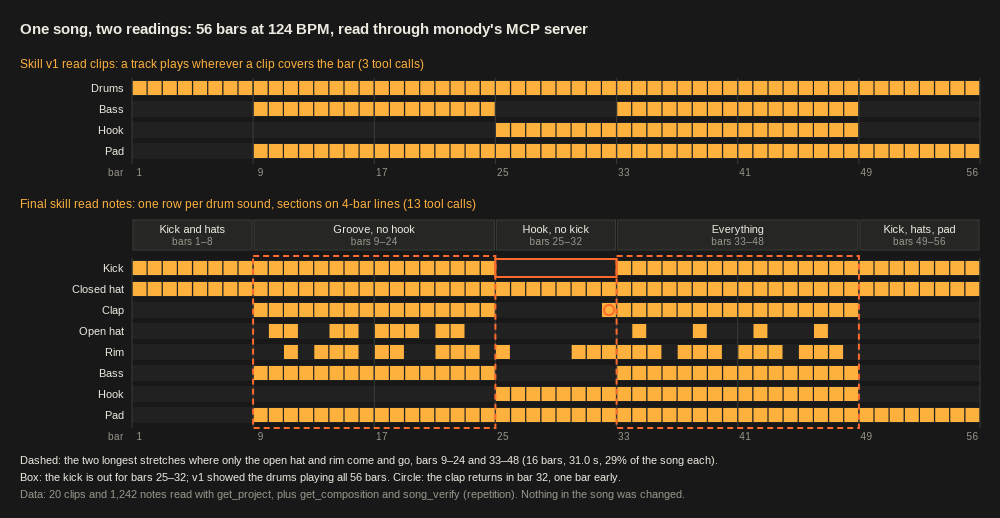
Claude followed the skill step by step. Step 1 took 13 read calls: the project (an overview, as the whole project is 155,959 characters), the four tracks, nine calls of 96 to 166 notes, get_composition and the repetition check. 173,129 characters came back. Claude's map:
| Section | Bars | Starts | Playing | Enters | Leaves |
|---|---|---|---|---|---|
| Kick and hats | 1–8 | 0:00.0 | Kick, closed hat | – | – |
| Groove, no hook | 9–24 | 0:15.5 | Kick, closed hat, clap, bass, pad | Clap, bass, pad | – |
| Hook, no kick | 25–32 | 0:46.5 | Closed hat, hook, pad | Hook | Kick, clap, bass |
| Everything | 33–48 | 1:01.9 | Kick, closed hat, clap, bass, hook, pad | Kick, bass | – |
| Kick, hats and pad | 49–56 | 1:32.9 | Kick, closed hat, pad | – | Clap, bass, hook |
- Transition: the clap returns in bar 32, one bar before the kick and bass, as six claps a sixteenth apart.
- In and out: open hat in short runs over bars 10–22, then one bar in four (34, 38, 42, 46). Rim in short runs over bars 11–23, then bars 25 and 30–35, then three bars in four up to bar 47.
- Longest unchanged stretch: bars 9–24 and 33–48: 16 bars, 31.0 seconds and 29% of the song each. The pad repeats one 4-bar cell from bar 9 to 32, the bass an 8-bar cell over bars 13–24, the hook an 8-bar cell from bar 28 to 48. No two drum bars are identical.
All five section starts match the answer key, and so does the break without a kick; the clap in bar 32 is the plan's roll. Every call and answer is in skill-run-session.json. The skill changed nothing, so there is no before and after to hear. Claude read notes; it did not listen (what Claude gets instead of sound).
What went wrong, and what it still misses
- The first draft read clips, not notes. Three calls found the right boundaries, but its rows were tracks, so "Drums" played all 56 bars. The kick was out for bars 25 to 32, the clap for 1 to 8, 25 to 31 and 49 to 56. A clip's span doesn't say what plays inside it. Reading the notes, one row per drum sound, cost 10 more calls.
- It named the wrong tool for the tempo. It said
get_compositiongives the tempo. That is the brief's bpm, the tempo the song was planned at; the playing tempo is inget_project'stempoMap. Both said 124 here, so following it would have given the same times. - The second draft cut too often. Its rule (a section starts wherever a part changes and holds for 4 bars) gave 14 sections the first time we applied it; applied to the letter it gives 11, six of them one or two bars long, cut by the open hat stopping (bars 23 and 47), the rim starting or stopping (26, 30, 48) and the clap returning (32). Starting sections only on 4-bar lines gave the plan's five.
- The description was too long for one of Anthropic's pages. Ours had 407 characters. The developer docs allow 1,024 and Claude Code's listing 1,536, but the Help Center page on custom skills says 200. We cut it to 185. The first short version, "by bar: sections", broke strict YAML (a colon then a space: "mapping values are not allowed here"), though
claude plugin validatepassed it. The published file passes both.
It still can't see a roll on a part that is already playing (the claps ending bars 24 and 48), the pad's change of voicing between the break and the drop, automation, or anything inside an audio clip. With monody, one answer holds about 180 notes, so a long song takes many reads, and a single clip above that is mapped by its span. And it only describes: whether the arrangement works is yours to hear.
Install it, and change it for your DAW
- Claude Code: unzip into
~/.claude/skills/, so the file sits at~/.claude/skills/mapping-arrangements/SKILL.md, or into a project's.claude/skills/. A running session picks it up. Ask for "an arrangement map of this song", or type/mapping-arrangements. - claude.ai: Customize, Skills, "+", Create skill, Upload a skill, then the ZIP. claude.ai connects to MCP servers from Anthropic's cloud, so it can't reach a DAW server on your computer (Help Center); there the skill asks for the pasted part list.
- monody: connect Claude Code as the MCP page shows. MCP is on every plan, Free included, and needs your own Claude Code access; the calls don't spend monody's AI credits.
- Another DAW: change the monody lines in step 1 to your server's read tools (ask Claude to list them, or read the server's README) and the pad rule in step 2 to however your DAW names drum pads. If your server can't read notes, you get the first draft's blind spot, labelled.
Mixing and mastering are another job: Can Claude mix and master? runs one.
We read Anthropic's documentation, the Help Center and every repository above on 24 November 2026, at the commits linked. The run was the same day: monody 0.9.7 on a Mac, Claude Opus 5.5 in Claude Code following the skill step by step, each tool call sent to monody's built-in MCP server on the same computer and logged. The folder passed claude plugin validate (Claude Code 2.1.322). The session log holds the final run, the first draft's calls and the setup that wrote the test song.
Sources
- Anthropic: Agent Skills overview, Skill authoring best practices (read 24 November 2026)
- Claude Code docs: Extend Claude with skills (read 24 November 2026)
- Claude Help Center: What are Skills?, Use skills in Claude, How to create custom skills, Custom connectors using remote MCP (read 24 November 2026)
- Anthropic: skills repository at e4bb5d9, 16 November 2026 (read 24 November 2026)
- Music skill repositories: linked in the table and the FL Studio paragraph, each at the commit read on 24 November 2026
Ableton and Live are trademarks of Ableton AG. Other product names are trademarks of their owners. monody is not affiliated with or endorsed by Anthropic or the makers named here.
Questions
- What is a Claude skill?
- A folder with a SKILL.md file. Claude always sees its name and a short description, and reads the instructions below them only when a request matches. A skill can also bundle scripts and reference files that Claude opens when the instructions point to them.
- Are there Claude skills for music production?
- Yes. On 24 November 2026 we found community skills that make audio with a local model or MiniMax's service, write prompts for Suno, drive Ableton Live, REAPER, Bitwig, Pro Tools or MuseScore, most through an MCP server, and work with chords, MIDI files and transcription. Most need other software installed.
- Is there a Claude skill for FL Studio?
- Several. One teaches Claude FL Studio's Python scripting API, and others ship with a bridge or a command-line tool for their own commands. None is from Image-Line.
- What is the difference between a Claude skill and an MCP server?
- A skill is instructions and files that tell Claude how to do a job. An MCP server is the door into a program, the tools Claude calls to read or change it. A skill that works on your DAW session needs a way into the DAW as well: usually its MCP server, sometimes a scripting API or command-line tool the skill calls.
- Can I make my own Claude skill for music production?
- Yes. Make a folder with a SKILL.md file that has a name, a description of what it does and when to use it, and the steps; in Claude Code the folder goes in ~/.claude/skills/. Our arrangement-map skill is 59 lines and is a free download on this page.