MCP
How to make music with Claude: an empty project to a finished WAV
Connect Claude Code to a DAW and go from an empty project to an exported WAV in five requests. One logged session, with the audio after every step.
The short answer. Use Claude Code on your computer and connect it to a DAW that it can edit, then ask for one change at a time. Claude writes the notes, picks the sounds and sets the levels as undoable steps in a real project. When it sounds right to you, export a WAV from the DAW. Below is one session from start to finish: five requests, 23 calls to monody, 2 minutes 53 seconds of Claude's time.
We make monody, the DAW used here. Its built-in MCP server is how Claude Code reads and edits the project.
Three ways Claude can make music
- In a plain chat, Claude explains theory and writes parts out as text, or as code that writes a MIDI file, which you carry into your DAW yourself.
- Through a skill, it drives an audio model and hands back a finished file. Skills for music production covers that route.
- Through a DAW it can edit, it writes notes, sounds and levels into a project you own.
This guide takes the third, because you end with a project you can open and change. Every route is compared in Claude for music production.
What you need
- monody 0.9.8, for Mac or Windows. The connection details are under Settings → Claude & Codex.
- A monody account, signed in. MCP is part of every plan, Free included; Free allows up to eight tracks, which is plenty for this session's three.
- Claude Code, on your own Claude account, run in a terminal on the same computer as monody.
The calls Claude makes to monody do not spend monody's AI credits. Chat apps that run in a browser or on a phone cannot connect, because the server listens only on your own computer.
Step 1: connect Claude Code to monody
- In monody, open Settings → Claude & Codex, pick Claude Code and copy the line.
- Paste it into Terminal on a Mac, or PowerShell on Windows, and press Return.
- Start
claude. Type/mcpto see monody listed as connected.
The MCP page has the full line, the tool list and what to do when the connection drops.
Step 2: ask for a starting point
We started from a new, empty project and sent Claude Code:
Start a tech house idea at 126 BPM in A minor: drums, a rolling bassline and a chord stab. 8 bars.
Claude read the empty project and monody's command reference first. It asked for the list of factory kits (that answer never reached it, see below), searched the sound presets and found the kit through the sample library. It sent one batch that set the tempo, loaded the Tech House Kit with a starter groove and wrote a bass part and a chord part. Then it chose two presets, Rolling Saw Bass and Deep Minor Chord, and measured the mix. That was 13 calls to monody and 81 seconds from the request to the reply.
What came back: 3 tracks, 159 drum hits, 65 bass notes and 96 chord notes. The chords are Am9 in bars 1 to 3 and 5 to 7, and Dm9 in bars 4 and 8, voiced without the root because the bass plays it. The loop measured −16.5 LUFS. Claude's reply said: "I haven't heard it; I only checked it with the level analysis."
The session log has every call and reply. The first request became three steps in monody's undo history: the batch and one per preset.
Step 3: change one thing per request
The bass is too busy. Leave room for the kick.
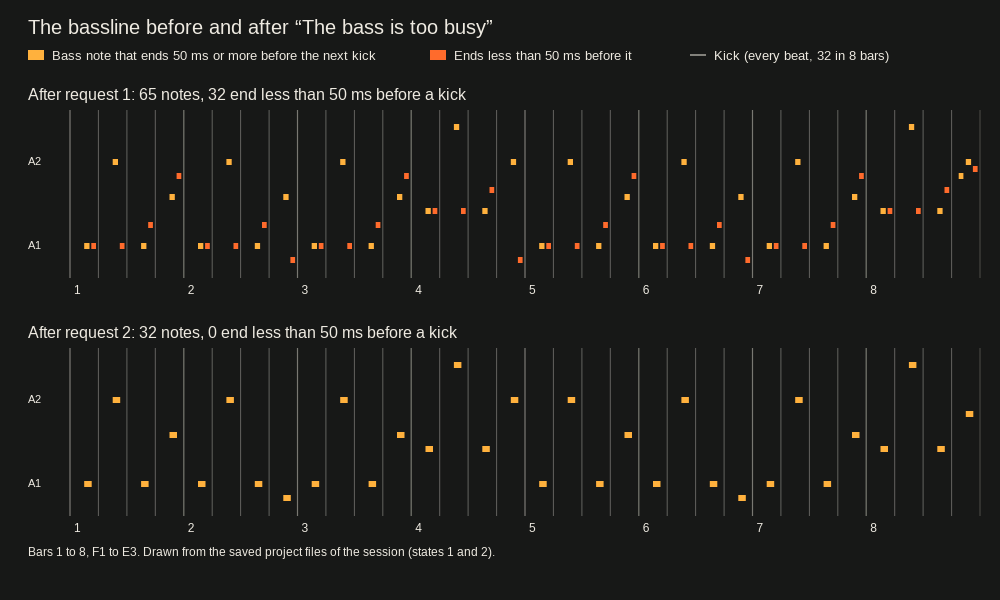
Claude did not read the project again. It rewrote the bass from the notes it had written itself: one batch that cleared the clip and wrote one 0.3-beat note on the and of every beat. Then it measured the kick and the bass below 150 Hz with monody's mix_relation and reported no bass under any of the 32 kicks. Two calls, 22 seconds.
bassTiming).| Bass, bars 1 to 8 | After request 1 | After request 2 |
|---|---|---|
| Notes | 65 | 32 |
| Closest note end before a kick | 24 ms | 95 ms |
| Kicks with bass under them, below 150 Hz | 1 of 32 | 0 of 32 |
| Bass share of the mix's loudness | 21 % | 13 % |
| Whole loop | −16.5 LUFS | −16.9 LUFS |
Claude measured only the new version; we measured the old one afterwards.
Then the structure:
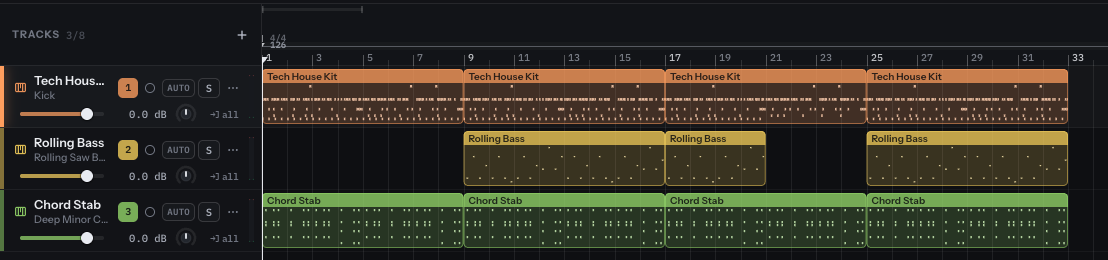
Make it 32 bars: 8 bars of intro without the bass, then the full groove, and a 4-bar break before the last 8.
Claude read the arrangement part of monody's reference and sent a batch of clip copies and moves. monody refused it, because shortening one bass copy left a note past its end, and nothing changed. Claude wrote a new 4-bar bass clip instead, sent the batch again, then removed the kick from the break in a third batch. Six calls, 49 seconds.
| Bars | What plays |
|---|---|
| 1 to 8 | Drums and chord stab, no bass |
| 9 to 20 | Drums, bass and stab; bars 17 to 20 use a 4-bar version of the bass |
| 21 to 24 | The break: stab, claps and hats, no kick, no bass |
| 25 to 32 | The full groove again |
Step 4: step back, then change something yourself
One request is not always one Undo. Each batch Claude sends is one labeled step, and request 3 was two of them. One Undo took back only the last one: the 16 kicks came back in the break, and the song's loudness range fell from 3.7 to 1.2 LU. One Redo brought back a render identical to the one before, sample for sample.
Then we changed two bass notes by hand. In the piano roll, we dragged the E2 on the last offbeat of bar 9 up to G2. Then we selected the G1 on the last offbeat of bar 10 and pressed Delete. Its row was below the part of the roll on screen, so the click landed in the velocity lane under it, which also selects the note. Each edit is its own Undo step in monody, labeled "move notes" and "delete notes".
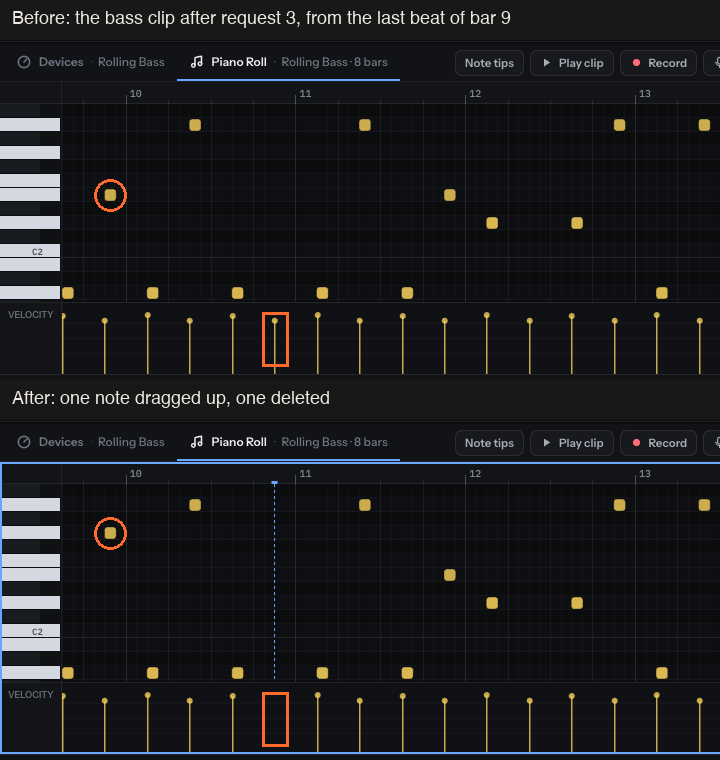
The edit changed bars 9 to 16 only. Claude had built bars 25 to 32 from a copy of the bass clip, not a loop, so that copy still plays the old notes. Claude was not told about the Undo, the Redo or the edit.
Step 5: check the loudness and export
Check the mix against streaming loudness and fix the biggest problem you find.
Claude made one call, master_to_target with the streaming target, and changed no track. It put one Maximizer on the master bus with +3.5 dB of gain and a −1.1 dBTP ceiling.
| Whole song | Before request 4 | After request 4 |
|---|---|---|
| Integrated loudness | −17.4 LUFS | −14.0 LUFS |
| True peak | −0.6 dBTP | −1.1 dBTP |
| Loudness range | 3.6 LU | 3.5 LU |
Readiness score in analyze_mix |
57 | 97 |
It listed what it left alone: the kit carries 63 % of the loudness and the bass 10 %, the top end measures dull, and the intro starts close to full level. Fourteen seconds. How loud should your master be? explains the −14 LUFS figure, and a whole mix-and-master session goes deeper than this step.
Master it to -14 LUFS.
Claude read the project's revision number, saw nothing new since its own master and changed nothing. One call, 8 seconds.
Then we exported. In monody, open the project menu (the button with your project's name in the top bar) and choose Export audio… (⇧⌘E); on a Mac, File → Export Audio… opens the same dialog. Choose the Listening copy (WAV, 24-bit) and Tail: Until silent; that is the request we sent. The file is 62.8 seconds long, −14.0 LUFS, −1.08 dBTP. Its last 1.9 seconds are the sound ringing out after bar 32.
How to ask Claude for music
- Put the musical facts in the first request. Request 1 named the tempo, key, parts and length, and all four came back with no question asked.
- Ask for one change, and name the problem. "The bass is too busy. Leave room for the kick." took two calls, and Claude checked its own change with a measurement.
- Give structure in bars. Request 3 named every section's length, and the arrangement matched it bar for bar.
- Ask for the check before the fix. "Fix the biggest problem" became the master, which left nothing for request 5. "Tell me the three biggest problems" lets you choose.
- Say when you changed something. Claude did not read the project again before request 2; it worked from what it had written. After an edit of your own, start with "read the project again".
- Read the numbers, then listen. The replies said what was measured, and four of five said Claude had not listened. What it reads instead of sound is in Can Claude hear music?
What went wrong, and what Claude cannot do here
- One answer was too big for Claude Code. The list of factory kits came back at 87,551 characters. Claude Code saved it to a file instead of passing it on. With only monody's tools allowed in our setup, Claude's two tries to open the file (Bash and Read, calls 8 and 9 in the log) were refused, and it searched the library instead.
- A batch was refused. In request 3, monody turned down the first try and applied nothing. Claude read the error and fixed it.
- A miscount. Claude's reply to request 2 said the bass went from 68 notes to 32. It wrote 65 in request 1.
- The intro is not an intro yet. It drops the bass as asked, but plays only 0.5 LU under the groove. Claude said so in two replies and suggested a sparser first 4 bars.
The standing limits: Claude does not hear the render. It makes no audio from a model; it writes notes and picks from monody's own sounds and devices. It works on the project that is open in monody, and from an app on the same computer (see What you need).
The same steps from Codex
Codex connects to the same server with a URL and one header, set once in its MCP settings. The steps, and two logged Codex sessions on a broken mix and a bassline, are in Codex for music production. We did not run these five requests in Codex.
We ran the session on 25 November 2026 (New York time) on a Mac. monody 0.9.8, a development build of the release source that asks for no sign-in or key, served a new, empty project from a scratch folder on the same computer. That is why the arrangement screenshot shows the Free plan's track count. Claude Code 2.1.322 sent the five requests non-interactively as one conversation (claude -p, then --resume), from an empty folder, with its built-in tools switched off (--tools "") and only monody's server attached. The model was Claude Opus 5.5. A logging proxy recorded every call. We sent the Undo, the Redo and the export to monody directly, and made the piano-roll edit with real mouse and key events in a private headless Chrome on monody's page. Times run from sending a request to its reply. Loudness is monody's analyze_mix on each state; the players are sample-exact bar cuts at 192 kb/s, measured by FFmpeg 8.0.1 as MP3s. Every state renders bit for bit the same in the released 0.9.8 app, and the export from the released app is the same file. The session log cuts each result at 1,500 characters and removes local paths and session ids. Nobody listened during the session.
Sources
- This session: claude-session.json, measurements.json (25 November 2026)
- Anthropic: Claude Code CLI reference, Connect Claude Code to tools via MCP (read 25 November 2026)
- monody: MCP page, plans (read 25 November 2026)
- FFmpeg: ebur128 filter, version 8.0.1
Claude and Claude Code are trademarks of Anthropic; Codex of OpenAI; FFmpeg of its project. monody is not affiliated with or endorsed by Anthropic or OpenAI.
Questions
- How do I make music with Claude?
- Connect Claude Code to a DAW it can edit, such as monody, then ask for one musical change at a time in plain words. Claude writes the notes, picks the sounds and sets levels in a real project, and you export the song from the DAW.
- Can Claude make music on its own?
- Claude writes notes, chooses sounds and changes settings through the tools a DAW gives it; it makes no audio itself and does not hear the result. In our session it reported measurements after each step, and four of its five replies said it had not listened.
- Does this work in Claude's chat or only in Claude Code?
- This guide uses Claude Code, run in a terminal on the same computer as monody. Chat apps that run in a browser or on a phone cannot connect, because the server listens only on your own computer.
- How should I prompt Claude to write music?
- Give the musical facts first (tempo, key, parts, length), then ask for one change per request and describe the problem, not the fix. Use bar numbers for structure, and ask for a check before you ask for a fix.
- What does it cost?
- Using your own Claude Code with monody is part of every monody plan, Free included; Free allows up to eight tracks, and Lifetime ($149 once), Pro ($14.99 a month or $149 a year) and Studio ($29.99 a month or $299 a year) remove that limit. Claude Code runs on your own Claude account, and the calls it makes to monody do not spend monody's AI credits.